
Most businesses treat GDPR as a legal box to tick: install a cookie banner, add a privacy policy link, move on. But consent is also a marketing problem. A banner set up the wrong way can quietly cut the conversion data your ads depend on, and a lead form that asks for consent the wrong way can leave you with a mailing list you’re not allowed to use.
This guide is for businesses that collect leads online and advertise in Europe. It covers six common mistakes in cookie consent banners and lead forms, why each one costs you data or leads, and how to check your own site in a few minutes.
This article is general information, not legal advice. For your specific situation, check with a qualified lawyer.
1. Tracking starts before the visitor chooses
Under EU rules, analytics and advertising cookies need the visitor’s consent before they are set. Yet on many sites, the tags load as soon as the page opens, and the banner only decides what happens afterwards.
How to check: open your site in a private browser window and don’t touch the banner. Right-click, choose Inspect, then open the Application tab (Storage in Firefox) and look at the cookies. If you already see Google Analytics (_ga), Google Ads (_gcl_au) or Meta (_fbp) cookies, your tracking runs before consent. Strictly necessary cookies, such as those that keep the site running or store the visitor’s language or consent choice, are fine; they don’t need consent.
This is usually a setup problem, not a tool problem: the tags are installed directly in the site instead of through the consent tool or a tag manager that waits for the visitor’s choice.
2. Refusing is harder than accepting
A banner with a big “Accept all” button and the refusal hidden behind “Settings” may get more clicks on Accept, but it isn’t the kind of consent the rules ask for. Consent has to be freely given, and European regulators, including France’s CNIL, have taken action against banners that make refusing harder than accepting.
How to check:
- Can visitors refuse on the first screen, with one click, as easily as they accept?
- Are all optional categories (statistics, marketing) switched off until the visitor turns them on?
- Is the banner in the visitor’s language? Consent has to be informed, and a banner in a language the visitor doesn’t read can hardly count. If your site is in three languages, the banner should be too.
- Can visitors change their choice later, for example through a “Cookie settings” link in the footer?
3. Consent Mode is missing or misconfigured
This is where consent becomes an advertising problem. Since March 2024, Google requires advertisers who reach users in the European Economic Area to send consent signals through Consent Mode v2 if they want to keep using features such as remarketing and full conversion measurement.
Consent Mode tells Google tags what the visitor agreed to. It works in two ways:
- Basic: Google tags don’t load at all until the visitor consents. Simple, but you get no data from visitors who refuse.
- Advanced: tags load in a restricted mode and send cookieless signals when consent is refused, which Google uses to model some of the missing conversions.
How to check: in Google Ads, open Goals → Conversions → Summary and look at the diagnostics for each conversion action; Google flags missing consent signals there. Tag Assistant also shows whether consent states are sent when the page loads. Without Consent Mode, campaigns optimise on less data, and the cost per lead can rise without any obvious cause. If you’re unsure how your setup works, start with tracking and analytics.
4. Marketing consent is pre-ticked or bundled with the form
Two patterns are still common on lead forms: a newsletter checkbox that’s already ticked, and a line such as “By submitting this form, you agree to receive marketing emails”. Under GDPR, consent must be an active choice and specific to its purpose. The EU Court of Justice confirmed in 2019 (the Planet49 case) that a pre-ticked box is not valid consent.
The cost is real: contacts collected this way may not be usable for email marketing, so the list you built may not be a list you can mail.
How to check: look at every form on your site.
- Is the marketing checkbox empty by default?
- Can the form be sent without ticking it? Answering an enquiry and sending marketing are two different purposes.
- Does the checkbox say clearly what the visitor will receive, and how often?
If you build email marketing on these contacts, this check comes first.
From our own site: dodoweb.net
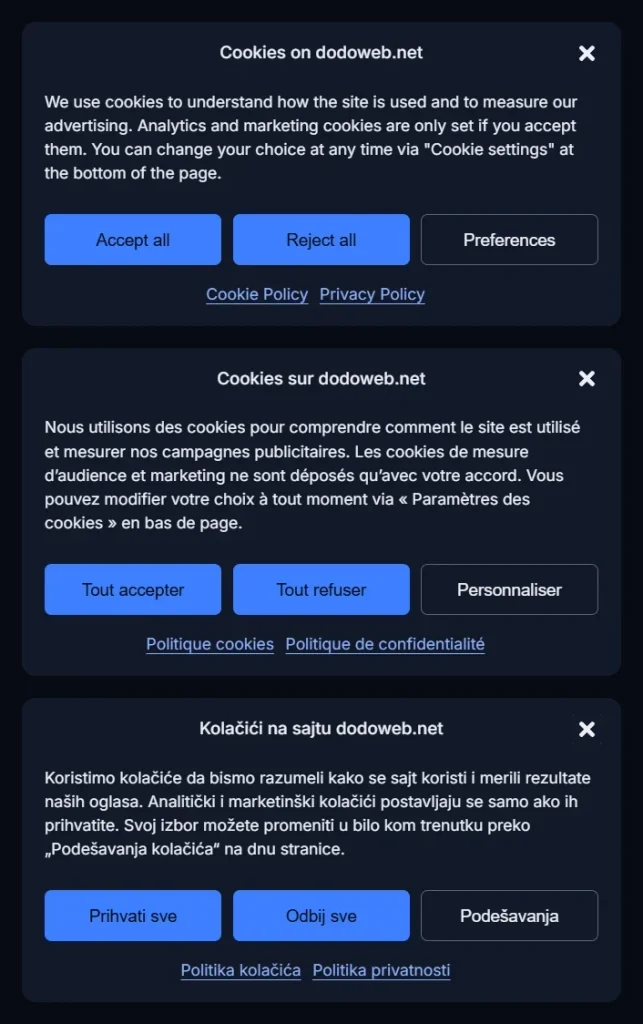
When we rebuilt dodoweb.net, we checked our own forms and banner against this list. The marketing checkbox is never pre-ticked, and the form works without it. The cookie banner shows in English, French and Serbian, which meant changing tools, because our previous free plan supported only one language. Analytics and advertising tags wait for consent, with Consent Mode passing the visitor’s choice to Google.
5. The form asks for more than it needs, without saying why
GDPR asks you to collect only the data you need for the purpose, and to tell people at the point of collection who you are and what you’ll do with their data. Many lead forms fail both: they ask for a phone number, company size and budget “just in case”, with no link to a privacy notice.
The good news is that the compliant version is usually the better-converting one too. Every extra field is one more reason to leave the page.
How to check: for each field, ask whether you use it to answer the enquiry. If not, remove it or make it optional. Then make sure a short line under the form links to your privacy policy, close to the submit button. For more on form design, see our page on landing pages and CRO.
6. You can’t prove who agreed to what
If someone asks, or a regulator does, you must be able to show that a person consented, when, and to what. Many businesses can’t: the form sends an email to the sales inbox, and the consent detail disappears along the way.
How to check: pick a recent lead and try to answer four questions from your own systems:
- When did this person submit the form?
- Which form, and in which language?
- Did they tick the marketing box?
- What did the text next to the checkbox say at that moment?
If you can’t answer all four, store the consent details with the lead in your CRM or email tool, and make sure an unsubscribe really stops the emails.
Frequently asked questions
Do I need consent to answer a contact form?
Generally, no. Replying to someone who asked you a question doesn’t usually rely on consent. Sending them marketing afterwards is a separate purpose, and that is where an explicit, unticked opt-in matters.
Does GDPR apply if my business is outside the EU?
It can. GDPR applies when you offer goods or services to people in the EU or monitor their behaviour, wherever your company is based. Several non-EU countries, including Serbia, have their own data protection laws closely modelled on GDPR.
Is a free cookie banner plugin enough?
It can be, if it blocks tags until consent, offers refusal on the first screen, supports all your site’s languages and passes consent to Google through Consent Mode. Check those four points before you rely on any tool, free or paid.
Where to start
Start with the first check: open your site in a private window and see what loads before you click anything. It takes two minutes and tells you whether your consent setup actually works. Then review your forms, and finally make sure consent is stored with each lead. Questions about your own setup? Contact us.